Table of Contents
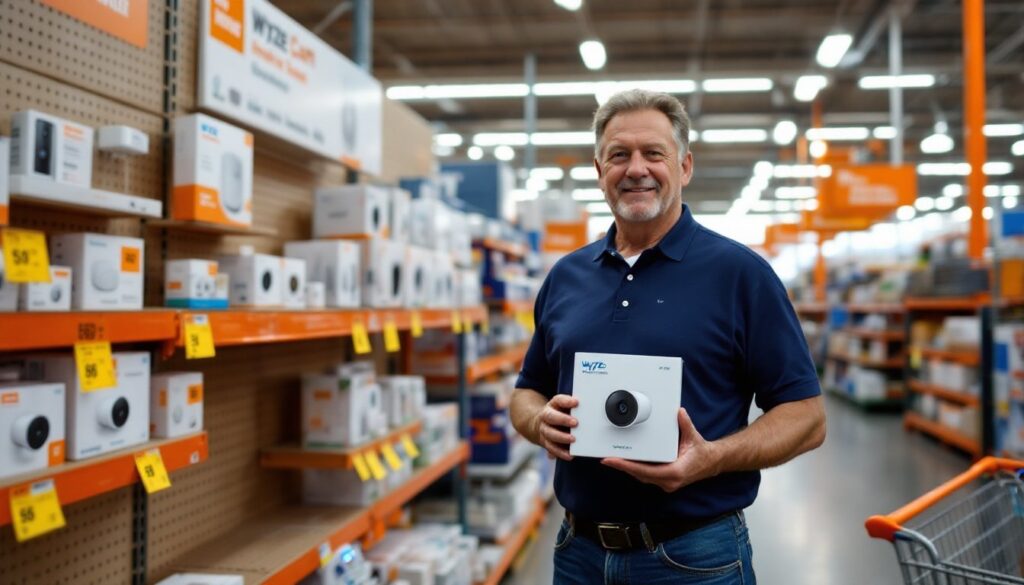
ToggleWalking into Home Depot to pick up a security camera used to mean choosing between overpriced big-name brands or questionable off-brand alternatives. Not anymore. Wyze cameras, known for packing high-end features into budget-friendly packages, are now widely stocked at Home Depot locations, giving DIYers immediate access to reliable smart security without the wait or inflated online shipping costs. Whether someone’s upgrading an existing setup or building a home security network from scratch, understanding which Wyze models Home Depot carries and how to install them properly can save both time and money while delivering the peace of mind that comes with knowing a property is monitored 24/7.
Key Takeaways
- Home Depot Wyze cameras deliver premium features like 1080p-2.5K resolution, night vision, and motion detection at $30–$60 per unit, making them a cost-effective alternative to $150–$300 competitors.
- Wyze Cam v4 (2.5K, $36) suits fixed monitoring of driveways and entries, while the Cam Pan v3 ($50) offers 360° motorized control ideal for open spaces like garages.
- In-store availability at Home Depot eliminates shipping delays and simplifies returns, though inventory varies by location—check online before visiting.
- Successful installation requires mapping coverage zones, testing 2.4 GHz Wi-Fi strength at each location, and mounting cameras 7–9 feet high to prevent tampering and capture usable facial details.
- Maximize performance by enabling firmware updates, tuning motion detection zones to cut false alerts by 80%, and using local microSD storage (up to 256GB) as a backup to cloud services.
- Integrate Wyze cameras with smart home routines to trigger automations like porch light activation on motion detection, transforming individual cameras into a responsive security ecosystem.
What Makes Wyze Cameras Available at Home Depot Stand Out?
Wyze cameras punch well above their price point, typically running $30–$60 per unit compared to $150–$300 for competitors with similar specs. That’s not a clearance-bin compromise, these cameras deliver 1080p or higher resolution, night vision up to 30 feet, motion detection with customizable zones, and two-way audio. The catch? They’re primarily sold online. Home Depot’s decision to stock select Wyze models in-store changes that, letting homeowners walk out the same day with cameras in hand.
What really sets Wyze apart is the ecosystem approach. Cameras integrate seamlessly with Wyze’s app, allowing users to control lighting, locks, and thermostats from the same interface. There’s no proprietary hub requirement for basic functionality, just a stable 2.4 GHz Wi-Fi network (5 GHz isn’t supported on most models, which trips up some first-timers). The free cloud storage option covers 14-day rolling event clips, though serious users often upgrade to Wyze Cam Plus ($1.99/month per camera) for full-length recordings and AI-powered person detection.
Home Depot’s in-store availability also means easier returns. If a camera doesn’t fit a specific install location or the Wi-Fi signal proves too weak, it’s a quick trip back rather than dealing with shipping labels and restocking fees.
Which Wyze Camera Models Can You Find at Home Depot?
Wyze Cam v4 and Wyze Cam Pan v3
The Wyze Cam v4 is the workhorse of the lineup. It captures 2.5K resolution (2560 x 1440), offers color night vision, and includes an IP65 weather-resistant rating for outdoor use. The magnetic base simplifies mounting, no drilling required if mounting to metal surfaces, though the included mounting plate and screws work for wood, vinyl, or masonry. At around $36, it’s the go-to for general-purpose monitoring of driveways, backyards, or entryways.
The Wyze Cam Pan v3 adds motorized pan (360°), tilt (93° vertical range), and 4x digital zoom, controlled via the app or set to auto-track motion. It’s ideal for wide-open spaces like garages or living rooms where a fixed camera would miss corners. The Pan v3 retails around $50 at Home Depot and includes the same 1080p resolution as earlier models. One heads-up: the motor isn’t silent, it’s audible in quiet rooms, which may or may not matter depending on placement.
Both models support microSD cards (up to 256GB, sold separately) for continuous local recording, bypassing cloud storage limits entirely. Format cards as FAT32 for best compatibility.
Wyze Cam Outdoor and Doorbell Options
The Wyze Cam Outdoor is the wire-free option, powered by a rechargeable battery that lasts 3–6 months depending on activity levels. It ships with a charging cable but benefits from the optional solar panel accessory for continuous charging in sunny locations. This model is perfect for spots without nearby outlets, think detached sheds, fence lines, or gates. It requires the Wyze Base Station (sometimes bundled, sometimes sold separately) to function, which connects to the home router via Ethernet.
Good Housekeeping has tested various doorbell cameras, and the Wyze Video Doorbell holds its own against pricier competitors. It requires existing doorbell wiring (16–24V AC transformer) and fits standard doorbell mounting holes. The 1:1 aspect ratio captures packages at the doorstep better than wide 16:9 cameras that waste pixels on driveway pavement. Home Depot typically stocks the wired version: the battery-powered Doorbell Pro is more hit-or-miss in stores.
Availability varies by location. Larger Home Depot stores stock four to six Wyze models: smaller locations may only carry the Cam v4 and Doorbell. Checking inventory online before driving over saves time.
How to Choose the Right Wyze Camera for Your Home
Start by mapping coverage zones. Walk the property and note spots where someone could approach undetected, side gates, basement windows, back doors. Fixed cameras like the Cam v4 excel at narrow, well-defined areas. For wide zones (decks, yards, driveways), the Pan v3 or multiple fixed cameras work better.
Power access is the next decision point. Wired cameras demand either a nearby outlet or willingness to run extension cords (use outdoor-rated 14- or 12-gauge cords, not indoor lamp wire). Wire-free models like the Outdoor eliminate that hassle but add battery maintenance to the to-do list. If running new wiring, consider a weatherproof outlet box and GFCI-protected circuit, especially for cameras near water sources like pools or hose bibs. This may require an electrician unless comfortable working with 120V household wiring and local codes permit DIY electrical work.
Wi-Fi range kills more DIY camera projects than any other factor. Wyze cameras need a strong 2.4 GHz signal, streaming video constantly eats bandwidth. Test signal strength with a smartphone at each proposed camera location. If bars drop below three, a Wi-Fi extender or mesh router node becomes necessary. Metal siding, stucco with wire mesh, and older plaster walls all degrade signals more than wood framing with vinyl.
For entry monitoring, the Video Doorbell is the obvious pick, but consider pairing it with a Cam v4 aimed at the driveway or street for package theft deterrence. Many homeowners are implementing smart home security upgrades to create layered monitoring that captures faces at the door and license plates at the curb.
Finally, think about long-term storage. The free 14-day cloud works for casual monitoring, but if documentation for insurance or law enforcement matters, local microSD recording or a paid subscription provides the paper trail. Cameras monitoring commercial properties or rental units often need 30–90 day retention, making the Wyze Cam Plus Unlimited plan ($9.99/month for unlimited cameras) a cost-effective option.
Installing Your Wyze Camera: A Step-by-Step DIY Guide
Tools and Materials:
- Drill/driver with bits (1/8″ for pilot holes in wood, masonry bit for brick/concrete)
- Screwdriver (Phillips head)
- Level (torpedo or 9″ works fine)
- Pencil for marking
- Ladder (if mounting above 6 feet)
- Wire strippers and voltage tester (for doorbell installations)
- Plastic anchors (if mounting to drywall or hollow surfaces)
Safety gear: Safety glasses and work gloves. Use hearing protection if drilling masonry.
Step-by-Step Installation:
-
Download the Wyze app (iOS or Android) and create an account before touching any hardware. The setup wizard walks through each camera model and won’t proceed without app access.
-
Charge or power the camera. Even wired models often need initial charging via USB before first use. Battery models must be fully charged, trying to set up a half-dead camera leads to failed connections.
-
Choose the mounting location. Aim for 7–9 feet high for security cameras to prevent tampering while keeping faces recognizable. Doorbells mount at standard height: 48 inches to the center button. Avoid aiming cameras directly at bright lights or into the sun, IR night vision will wash out, and daytime footage will be overexposed.
-
Mark and drill pilot holes. Hold the mounting plate level, mark screw holes with a pencil, then drill 1/8″ pilots into wood or composite. For brick or stucco, use a 5/32″ masonry bit and insert plastic anchors. The included screws are typically #6 x 1″, fine for wood studs or anchors but too short for thick siding, grab #8 x 1.5″ stainless screws if mounting through material thicker than 1/2″.
-
Secure the mounting plate and attach the camera. The Cam v4’s magnetic mount snaps on: the Pan v3 screws directly to its base. Run cables along eaves, through drilled holes, or inside cable raceways for clean installs. Secure outdoor cables with UV-resistant cable clips every 12–18 inches.
-
Connect to Wi-Fi via the app. The app generates a QR code: hold a phone screen 6–8 inches from the camera lens. It’ll chime when paired. If it fails, double-check that the router broadcasts 2.4 GHz and the phone is connected to that band (not 5 GHz).
-
Adjust angles and test detection zones. Walk through the camera’s view while watching the live feed. Set motion detection zones to exclude trees, busy streets, or neighbors’ yards, false alerts burn through cloud storage and battery life.
Doorbell-specific steps: Turn off power at the breaker before touching doorbell wiring. Use a voltage tester to confirm wires are dead. Most transformers are 16V AC: Wyze doorbells work from 16–24V. If upgrading from a mechanical chime, install the included chime adapter to prevent buzzing. Wire connections are straightforward, attach to existing screw terminals, no polarity concerns with AC.
Maximizing Your Wyze Camera’s Performance and Features
Firmware updates matter more than most DIYers realize. Wyze pushes updates frequently to patch security vulnerabilities and add features. Enable auto-updates in the app or check manually every month. Cameras on outdated firmware miss out on improved night vision algorithms, better motion tracking, and bug fixes that prevent random disconnects.
Detection zones prevent notification fatigue. Spending five minutes drawing zones around driveways, walkways, and entry points, while excluding swaying branches, passing cars, or the neighbor’s cat, cuts false alerts by 80%. The Wyze Cam Floodlight review highlights how well-tuned detection zones make outdoor cameras dramatically more useful, especially in high-traffic areas.
Scheduled recording saves bandwidth and storage. Most homes don’t need 24/7 monitoring, set cameras to record only during work hours or overnight. The app allows different schedules per camera, so the backyard camera can run all night while the garage camera only activates when everyone’s gone.
Two-way audio works best with realistic expectations. It’s clear enough for telling a delivery driver where to leave a package or scaring off a porch pirate, but the half-second delay makes actual conversations awkward. The microphone picks up wind noise outdoors, mounting cameras under eaves or using the optional silicone case reduces that.
Local storage is the backup plan. Cloud services fail, internet goes down, and subscriptions lapse. A 128GB microSD card (Class 10 or UHS-1 speed rating minimum) stores roughly two weeks of continuous recording or months of event-only clips. Format cards in the app, not a computer, Wyze uses specific file structures.
Integrate with smart home routines. Wyze cameras trigger actions in Amazon Alexa, Google Assistant, and IFTTT. Set a rule so when the driveway camera detects motion, porch lights turn on automatically. Or have the doorbell camera announcement play on Echo devices throughout the house. These automations turn basic cameras into a responsive security ecosystem.
Clean the lens quarterly. Spiderwebs, dust, pollen, and water spots degrade image quality faster than any hardware failure. A microfiber cloth and a quick wipe during gutter-cleaning season keeps footage sharp. For cameras mounted high, a telescoping pole with a cloth zip-tied to the end beats dragging out the ladder every time.